Tutorial
This tutorial is split into 2 parts. The first part covers the basics of AI or machine learning. The second part is machine learning with robotics.
#1 Machine Learning with p5.js and ml5.js
The first tutorial is designed for beginners in Artificial Intelligence, particularly those new to p5.js, ml5.js, or Machine Learning in general. It offers a simple, step-by-step approach that you can progress at your own pace. You can download the PDFs and print them out or have them displayed side by side with the p5.js web editor (recommended).
#2 Intelligent Machines with Arduino Nano 33 BLE
Using a small micro-controller we will develop ideas and concepts around machine learning (AI) in robotics. There are links to p5.js and ml5.js as well as looking at embedded AI where the model sits inside the micro-controller.
Introduction to part #1
The tutorial is freely available, and the p5.js web editor is also free to use. By the end of this tutorial, you’ll have a solid understanding of Artificial Intelligence (Machine Learning), Neural Networks, and coding in p5.js. The possibilities for what you do with this knowledge are endless, and it’s up to your creativity and motivation to explore them. The library used for the Machine Learning is called ml5.js.
The tutorial consists of three modules that guide you through a series of units that develop different concepts, ideas, and applications. While I recommend following the tutorial in a linear fashion, you’re free to skip or jump ahead if you prefer. If you’re new to coding or p5.js, I’ve included some coding snippets that cover the essential code you’ll need for this tutorial. However, I recommend not skipping these sections unless you’re already very familiar with p5.js or a seasoned coder.
Above all, enjoy the learning process and don’t be discouraged by setbacks. You can only grow in experience through doing.
These three introductory sections are there to help you understanding what you are doing and why. I recommend reading through them and this will help you in the tutorial as you work through the units. I will assume that you have read through them so I don’t have to repeat myself. They are pretty brief and a quick read so don’t skimp on this despite your eagerness to get going, there are some key bits of information you will need for later on.
A Brief Summary of Artificial Intelligence
This quick read through gives you some background information on Artificial Intelligence, Machine Learning and in particular to Neural Networks and what they are.

An Exploration of p5.js
To access this tutorial you will need a basic understanding what p5.js is and also how the web based editor and all its buttons and settings work and benefit you.
Videos
video #1: how to start using the editor
video #2: some of the buttons used in the editor
video #3: looking at the editor in a little more detail
video #4: creating a new file

An Overview of ml5.js
Although p5.js is the main coding environment it the ml5.js library that does all the heaving lifting when it comes to the Artificial Intelligence and Machine Learning units.

Module A building an AI model
Module A is where we start our journey, work through each unit and I recommend that you don’t skip a unit. The coding snippets have been kept as brief as possible so that when you are working through the AI units you have some understanding of p5.js while attempting to grasp the concepts of AI. This module uses ml5.js and explores some simple examples that will demonstrate key features.
Module A Unit #1 p5.js Code Snippets Part 1
To create your AI models you do need to code, this is a quick introduction to the key concepts that you will need, it is ideal for those who have never coded before and a good introduction to p5.js for those who have.

Module A Unit #2 Linear Regression
In this first unit we plot points for a straight line with some variance (randomness). The neural network (ml5.js) will be trained on these data points and will approximate to the line. This is a regression task where you will train it on some synthetic data and then predict the outcome.

Module A Unit #3 Sine Wave Regression
This is similar to unit #1 but a bit more challenging for the neural network to learn, here we will introduce some more hyperparameters to help in the learning process, hopefully with improved accuracy.

Module A Unit #4 Mouse Gesture
This is a classification task. We will give the neural network a small amount of synthetic data on the movement of the mouse, it will try to predict whether the mouse is moving up, down, left or right.

Module A Unit #5 p5.js Code Snippets Part 2
An introduction to some key concepts used in the next section, such as using video and exploring pixels.

Module A Unit #6 Cluster Classification
This is a supervised learning model. We are going to click on the canvas in four areas. In each quadrant we will create a set of ten circles then we will predict the colour in the space between the circles

Module A Unit #7 Cluster Regression
Here we will click on the canvas to create a cluster of white circles and a cluster of black circles. We will train it on those data points and then predict what shade of grey the canvas is between those data points.

Module A Unit #8 Colour Predictor
Train the neural network to predict three colour groups using synthetic data and testing with sliders.

Module A Unit #9 Pixel Predictor
In this unit we take the pixels from an image (webcam) and train the neural network to move a circle with your head

Module A Unit #10 Save and Load
This unit covers saving/loading data, and saving/loading models once trained

Module B pretrained models
Module B looks at some pretrained models which means that they have done all the hard work of collecting the data and training the models. The reason for this module is that you can use these pretrained models to develop other applications and creative endeavours. It is also quite fun.



Module C Neuro Evolution
Module C is a bit more challenging, it is looking at Reinforcement Learning through the use of Genetic Algorithms. The algorithm we will be using is a neuro evolution approach which means that we put a neural network in a car and a bird respectfully. We allow them to reproduce and over time we select the ones that perform best according to their fitness scores.

Module C Unit #2 Introduction to Genetic Algorithms
Although we will be using a neural network which means that it is a neural evolution approach, the fundamentals are based on genetic algorithms where we select the fittest and mate them to reproduce a better next generation. This is offers a bit more explanation.


Intelligent Machines
This section introduces the microcontroller. Specifically the Arduino Nano 33 BLE. It is small and yet powerful enough to be used with AI or Machine Learning models. There are four modules take you step by step in using the Arduino Nano 33 BLE, connecting it to p5.js, then linking it a ml5.js model using its internal accelerometer before finally building a Artificial Neural Network inside the microcontroller itself.
Module A: Arduino Nano 33 BLE basics
Module B: Arduino and p5.js
Module C: Arduino and ml5.js
Module D: Arduino and Artificial Neural Network
Module E: Servo and AI model
Module A
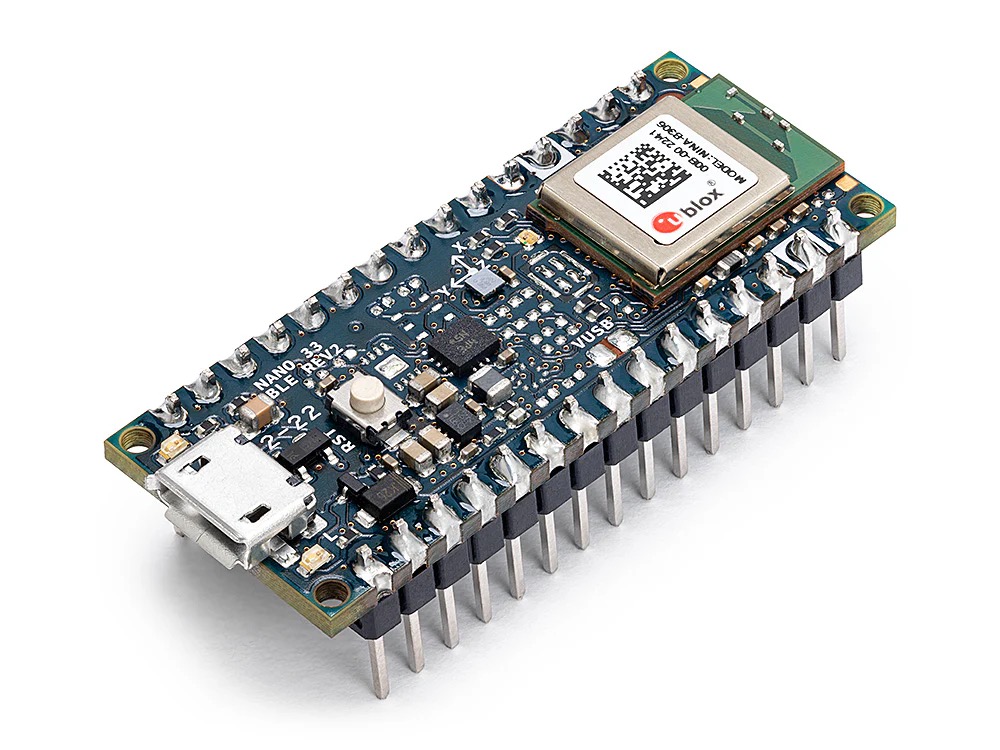
Module A covers the basic functions of coding the Arduino Nano 33 BLE. if you are already familiar with coding in the Arduino ecosystem then you can probably skip this part. Click on the links below to download the PDFs.
Module A Unit #1 Hardware
What hardware are you going to need to complete these modules and units of work? There are a number of components that you will need, the main one is the Arduino Nano 33 BLE itself. This is the micro-controller you will be using. there are other components as well.
Module A Unit #2 Software
To upload our sketches to our Arduino Nano 33 BLE microcontroller we need to use Arduino’s software. This uses the C/C++ coding language and is very similar in structure to p5.js, which is helpful.
Module A Unit #3 Blinking
The best place to start is to get the built-in LED to blink. This is what is called the Hello World! of coding an Arduino board. This may seem very simple but it introduces you to the basics of creating the sketch, uploading it and running the code on the Arduino board.
Module A Unit #4 Functions
Functions are key part of coding and in this unit we will explore what they and how to use them. There are some clear similarities as to how functions are used in p5.js, so, not a steep learning cure.
Module A Unit #5 Random and Arrays
Being able to generate random numbers is useful in coding robotics and there are clever ways to generate random numbers. Arrays are powerful tools to storing and retrieving data, this unit explores how they are used with C/C++.
Module A Unit #6 Boolean
Boolean logic uses, well, logic, logic gates to be specific. The main boolean gates covered are the simplest ones AND and OR, with these you can do a lot.
Module A Unit #7 Serial Communication
The Arduino Nano 33 BLE can communicate with the computer through the USB serial connection. This is useful for sending data or information back and forth between the board and the computer.
Module A Unit #8 RGB LED
The Arduino Nano 33 BLE has two built-in LEDs. the first one we have already covered. Here is the second one and has three colours, Red, Green, and Blue. Although you cannot mix them to make all the colours in between. It is useful for other reasons.
Module A Unit #9 Button
Although the board has a button we cannot use it except to reset the board. Here we add a button component using the breadboard. It is a tactile button which means it makes a connection when pressed and not when released.
Module A Unit #10 Accelerometer
The Arduino Nano 33 BLE has a built-in module that can measure the acceleration of its movement. This is called an accelerometer.
Module A Unit #11 Gyroscope
The Arduino Nano 33 BLE has a built-in module that can measure the rotational (angular) acceleration of its movement. This is called a gyroscope.
Module A Unit #12 Magnetometer
The Arduino Nano 33 BLE has a built-in module that can measure the magnetic field around the board. This is called a magnetometer.
Module B
Module B in this module we can now connect a p5.js sketch with our Arduino Nano 33 BLE and have some fun. Click on the links below to download the PDFs.
Module B Introduction to 3D Shapes
Before beginning this module I recommend working through this unit that introduces 3D shapes in p5.js. It is not essential but we will be using this in the final unit of this module.
Module B Unit #1 p5.js and LED
Here you are going to connect the Arduino Nano 33 BLE with a p5.js sketch. To just switch the LED on and off by clicking the canvas.
Module B Unit #2 p5.js and LED Slider
Rather than just switching the LED on and off we will use a slider in p5.js and control the brightness of the LED.
Module B Unit #3 p5.js and RGB LED
Using p5.js we will select the appropriate colour from the RGB LED as we hover over that colour on the canvas.
Module B Unit #4 p5.js and a Button
Attaching a button to the Arduino Nano 33 BLE and then control the colour of a circle as the button is pressed.
Module B Unit #5 p5.js and the Accelerometer
Using the built-in IMU and the 3D graphics of p5.js we can simulate the movements of the board on the canvas. you need to quickly run through the coding snippets for p5.js 3D first (not absolutely essential).
Module C
Module C we will first collect real data from the accelerometer, then reformat it and add the data to the model to train and predict the movement. Click on the links below to download the PDFs.
Module C Unit #1 Collecting Data
As well as connecting with a p5.js sketch we can also connect with the ml5.js machine learning library. First however we need to collect the data for four movements. this takes you step by step through the process.
Module C Unit #2 Predicting Accelerometer
Once we have the data we can train it, produce the model and test it out by seeing how well it predicts the movement when we move the board.
Module D
Module D this is an advancement on what we have done already, here we are going to put a neural network into the Arduino Nano 33 BLE, train it and predict. This is a very simple example but demonstrates what can be done even in a microcontroller. Click on the links below to download the PDFs.
Module D Unit #1 Truth Table
Adding two buttons and using OR and XOR truth tables to hard code both conditions.
Module D Unit #2 Neural Network
Instead of hard coding you are going to create a small neural network inside the Arduino, train it and predict the XOR truth table of two buttons.
Module E
Module E using a pretrained model we will move a servo attached to the Arduino Nano 33 BLE by moving our index finger from right to left and back again. Click on the links below to download the PDFs.
Module E Unit #1 Servo
Basic introduction to attaching a micro-servo to the Arduino Nano 33 BLE. This unit will take you through the steps of controlling the servo.
Module E Unit #2 p5.js slider
Connecting the servo to p5.js and controlling it with a slider in a p5.js sketch.
Module E Unit #3 servo control with AI
Using the pretrained AI model handPose to control the movement of the servo.